Cutting the Cord: Stream Live TV Without Cable in 2025

Cutting the cord in 2025 means ditching traditional cable and utilizing streaming services, antennas, and smart devices to access live TV, offering cost savings and greater flexibility in content selection.
Are you tired of high cable bills and limited channel options? The future of television is here, and it involves **Cutting the Cord: How to Stream Live TV Without Cable in 2025**. Discover how to enjoy your favorite live content without the expensive cable subscriptions.
Why Cut the Cord in 2025?
Cutting the cord has become increasingly popular, and for good reason. In 2025, the benefits are even more pronounced. Let’s explore the key reasons why ditching cable is a smart move.
Switching to streaming offers not only flexibility but also significant cost savings. The average cable bill continues to rise, making streaming a much more attractive and economical option.
Cost Savings with Streaming
One of the primary drivers for cutting the cord is the potential for significant cost savings. By switching to streaming services, you can drastically reduce your monthly TV expenses.
- Lower Monthly Bills: Streaming services typically cost less than traditional cable packages.
- No Hidden Fees: Cable companies often charge extra for equipment rental and other fees that streaming services avoid.
- Customizable Packages: With streaming, you only pay for the channels and services you want.
Flexibility and Customization
Streaming offers a level of flexibility and customization that cable simply can’t match. You have the power to choose exactly what you want to watch and when you want to watch it.
- On-Demand Content: Access a vast library of movies and TV shows whenever you please.
- No Contracts: Most streaming services don’t require long-term contracts, allowing you to cancel anytime.
- Multiple Devices: Watch your favorite content on your TV, computer, tablet, or smartphone.
In conclusion, cutting the cord in 2025 offers substantial advantages in terms of cost savings and viewing flexibility. With the rise of streaming services, it’s easier than ever to enjoy live TV without the burden of a cable subscription.
Essential Equipment for Streaming Live TV
To successfully stream live TV without cable, you’ll need a few key pieces of equipment. These include a reliable internet connection, a streaming device, and potentially an antenna. Let’s break down each component.
Having the right equipment ensures a seamless streaming experience. Investing in these tools will pay off in the long run with access to a world of content at your fingertips.
Streaming Devices
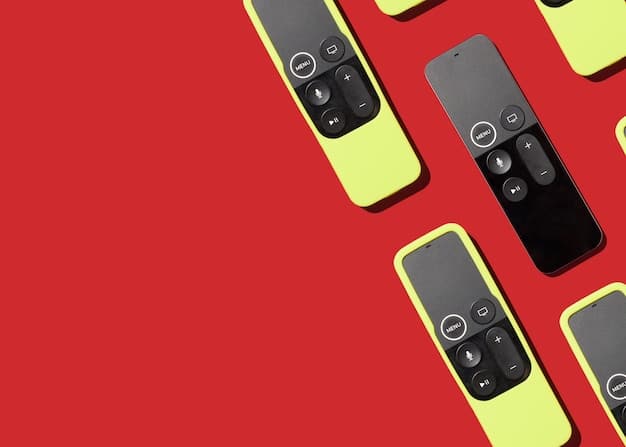
Streaming devices are the heart of your cord-cutting setup. They connect to your TV and allow you to access streaming services through a user-friendly interface.
Popular choices include Roku, Amazon Fire Stick, Apple TV, and Chromecast. Each device has its own interface and features, so choose one that fits your needs.
Antennas for Local Channels
For accessing local channels, an antenna is an invaluable tool. It allows you to watch broadcast TV for free, including news, sports, and entertainment.
- Over-the-Air (OTA) Broadcasts: Antennas pick up free broadcasts from local TV stations.
- HD Quality: OTA broadcasts are often in high definition, providing excellent picture quality.
- One-Time Purchase: Unlike streaming subscriptions, an antenna is a one-time investment.
Choosing the right equipment is crucial for cutting the cord effectively. With the right streaming device and an antenna, you can enjoy a wide variety of content without relying on cable.
Top Streaming Services for Live TV in 2025
The streaming landscape is constantly evolving, but in 2025, several services stand out as top contenders for live TV streaming. These platforms offer a wide range of channels and features to cater to different preferences.
Selecting the right streaming service is a personal decision based on your viewing habits and budget. Let’s explore some of the leading options available.
YouTube TV
YouTube TV is a popular choice for its comprehensive channel lineup and user-friendly interface. It offers a wide range of live TV channels, including sports, news, and entertainment.
Key features include unlimited DVR storage, family sharing, and the ability to watch on multiple devices simultaneously. YouTube TV is a solid option for those seeking a cable-like experience without the cable bill.
Hulu + Live TV
Hulu + Live TV combines live TV streaming with Hulu’s extensive on-demand library. This makes it an attractive option for those who want both live content and a vast selection of movies and TV shows.
- On-Demand Library: Access Hulu’s extensive collection of on-demand content.
- ESPN+ and Disney+: Bundled with ESPN+ and Disney+ for a comprehensive entertainment package.
- Customizable Add-ons: Add premium channels and features to tailor your subscription.
Sling TV
Sling TV is known for its affordable pricing and customizable channel packages. It offers a variety of plans to suit different budgets and viewing preferences.
- Affordable Options: Choose from different base plans with varying channel lineups.
- Add-on Channels: Customize your subscription with add-on packages for sports, news, and entertainment.
- Multiple Streams: Some plans allow simultaneous streaming on multiple devices.
The streaming service you choose will heavily influence your cord-cutting experience. Carefully consider your channel preferences, budget, and desired features before making a decision.
Setting Up Your Streaming Service
Once you’ve chosen a streaming service, the next step is setting it up on your devices. This process is generally straightforward, but let’s walk through the key steps to ensure a smooth experience.
Setting up your streaming service properly ensures you get the most out of your subscription. Follow these steps to start enjoying your favorite content without cable.
Creating an Account
The first step is creating an account with your chosen streaming service. You’ll need to provide your email address, create a password, and enter your billing information.
Be sure to choose a strong password and keep your account information secure. Once your account is created, you can start exploring the available content.
Installing the App on Your Devices
Next, you’ll need to install the streaming service’s app on your TV or streaming device. Most streaming devices have app stores where you can easily download and install apps.
- App Store: Navigate to the app store on your streaming device.
- Search: Search for the streaming service app by name.
- Install: Download and install the app on your device.
Activating Your Device
After installing the app, you’ll need to activate your device. This usually involves logging in with your account credentials or entering an activation code provided by the streaming service.
- Login: Open the app and log in with your email and password.
- Activation Code: Some services require you to enter an activation code on their website.
- Follow Instructions: Follow the on-screen instructions to complete the activation process.
Properly setting up your streaming service is essential for a seamless viewing experience. Take the time to follow these steps and ensure your devices are correctly activated.
Optimizing Your Internet Connection for Streaming
A stable and fast internet connection is crucial for streaming live TV without interruptions. Let’s explore how to optimize your internet setup to ensure the best possible streaming experience.
Don’t let a slow or unstable internet connection ruin your cord-cutting experience. By optimizing your network, you can enjoy smooth, high-quality streaming.
Checking Your Internet Speed
Start by checking your internet speed to ensure it meets the recommended requirements for streaming. Most services recommend at least 25 Mbps for HD streaming.
Use online speed test tools to measure your download and upload speeds. If your speeds are too low, consider upgrading your internet plan.
Using a Wired Connection
For the most reliable connection, use a wired Ethernet connection instead of Wi-Fi. A wired connection eliminates potential interference and provides a more stable signal.
Connect your streaming device directly to your router using an Ethernet cable. This can significantly improve streaming performance, especially for live TV.
Optimizing Your Wi-Fi Network
If you need to use Wi-Fi, there are several ways to optimize your network. These include positioning your router in a central location, reducing interference, and using a Wi-Fi extender.
- Router Placement: Place your router in a central location, away from walls and obstructions.
- Reduce Interference: Minimize interference from other devices by using the 5 GHz band instead of 2.4 GHz.
- Wi-Fi Extender: Use a Wi-Fi extender to boost the signal strength in areas with weak coverage.
Optimizing your internet connection is essential for a smooth and enjoyable cord-cutting experience. Whether you use a wired or wireless connection, take steps to ensure your network is up to the task.
Future Trends in Streaming Live TV
The world of streaming is constantly evolving, and in 2025, several trends are shaping the future of live TV. From advancements in technology to changes in consumer behavior, let’s explore what’s on the horizon.
Staying informed about future trends can help you make the most of your cord-cutting setup. Here’s what you can expect to see in the coming years.
Increased Streaming Quality
As technology advances, streaming quality is expected to improve significantly. Higher resolutions, faster frame rates, and better compression algorithms will enhance the viewing experience.
Expect to see more content available in 4K and even 8K resolution, providing stunning visuals and immersive viewing experiences.
More Personalized Content
Streaming services are increasingly using data and AI to personalize content recommendations. This means you’ll see more content tailored to your specific interests and viewing habits.
- AI-Powered Recommendations: Advanced algorithms analyze your viewing history to suggest relevant content.
- Customizable Interfaces: Streaming services will offer more customizable interfaces to prioritize the content you care about.
- Interactive Content: Expect to see more interactive content, such as choose-your-own-adventure style shows.
Bundling and Partnerships
As the streaming market becomes more competitive, expect to see more bundling and partnerships between streaming services. This could include discounted rates for subscribing to multiple services or bundled packages that combine live TV with on-demand content.
- Discounted Rates: Bundling multiple services can result in lower overall costs.
- Combined Packages: Get access to a wider variety of content with bundled packages.
- Seamless Integration: Streamlined access to multiple services through a single interface.
The future of streaming live TV is bright, with exciting advancements on the horizon. By staying informed about these trends, you can position yourself to take full advantage of the evolving streaming landscape.
| Key Point | Brief Description |
|---|---|
| 💰 Cost Savings | Streaming is often cheaper than traditional cable. |
| 📺 Streaming Devices | Essential for accessing streaming services on your TV. |
| 📡 Antennas | Provide access to free local channels. |
| 🌐 Internet Optimization | Ensures smooth and uninterrupted streaming. |
Frequently Asked Questions
▼
Cutting the cord refers to canceling your cable TV subscription and using alternative methods, such as streaming services and antennas, to watch television. This can lead to significant cost savings.
▼
You’ll need a reliable internet connection, a streaming device (like Roku or Apple TV), and potentially an antenna for local channels. Some smart TVs have built-in streaming capabilities.
▼
Popular options include YouTube TV, Hulu + Live TV, Sling TV, and FuboTV. Each offers different channel lineups and features, so compare them to find the best fit for you.
▼
Ensure you have a fast and stable internet connection, use a wired connection if possible, and optimize your Wi-Fi network by positioning your router in a central location. A strong internet connection results in less buffering.
▼
Future trends include increased streaming quality (4K and 8K), more personalized content recommendations, and bundling and partnerships between streaming services to offer more comprehensive packages.
Conclusion
Cutting the cord to stream live TV in 2025 is a smart move that offers flexibility, cost savings, and access to a wide range of content. By understanding the necessary equipment, top streaming services, and optimization techniques, you can enjoy a seamless and enjoyable viewing experience without the burden of traditional cable.