Unlock Peak Performance: Ultimate Gaming Console Optimization Guide 2026

Are you ready to elevate your gaming experience to unprecedented heights in 2026? In the fast-evolving world of video games, mere ownership of cutting-edge hardware is no longer enough to guarantee victory or the most immersive gameplay. To truly dominate the digital battlegrounds and fully appreciate the breathtaking graphics and seamless mechanics of modern titles, you need to master the art of console optimization guide. This comprehensive guide is meticulously crafted to empower you with the knowledge and strategies to squeeze every last drop of performance from your beloved gaming console, ensuring you’re always playing at your absolute best.
The year 2026 brings with it a new generation of games that demand more from our systems than ever before. From hyper-realistic open worlds to lightning-fast competitive multiplayer, the technical requirements are constantly pushing boundaries. Without proper optimization, even the most powerful console can suffer from frame rate drops, input lag, and frustrating stutters, turning what should be an exhilarating experience into a test of patience. This isn’t just about technical tweaks; it’s about understanding the synergy between your hardware, software, network, and even your physical setup to create the ultimate gaming environment. Our console optimization guide will walk you through every critical aspect, from initial setup to advanced maintenance, ensuring your console remains a finely tuned gaming machine.
The Foundation of Performance: Understanding Your Console’s Hardware
Before diving into specific adjustments, it’s crucial to have a foundational understanding of your console’s core components. Each element plays a vital role in overall performance. Knowing what each part does helps you identify potential bottlenecks and prioritize your optimization efforts. This section of our console optimization guide demystifies the internal workings of your machine.
CPU and GPU: The Brains and Brawn
Your console’s Central Processing Unit (CPU) and Graphics Processing Unit (GPU) are the heart and soul of its performance. The CPU handles game logic, AI, physics, and other computational tasks, while the GPU is responsible for rendering all the visuals you see on your screen. In 2026, both are more powerful than ever, but they can still be strained by unoptimized settings or background processes.
- CPU Overload: If your CPU is constantly running at or near 100% utilization, it can lead to stuttering and frame drops, especially in complex scenes. This is often exacerbated by too many background applications or system services running simultaneously.
- GPU Bottleneck: A GPU bottleneck occurs when the graphics card can’t keep up with the demands placed on it, resulting in lower frame rates. This is typically the case when graphics settings are too high for the GPU’s capabilities.
RAM: The Console’s Short-Term Memory
Random Access Memory (RAM) acts as your console’s short-term memory, storing data that the CPU and GPU need to access quickly. Insufficient or slow RAM can lead to longer loading times and micro-stutters as the system struggles to retrieve necessary assets. While console RAM isn’t typically upgradeable like PC RAM, optimizing its usage is still key.
Storage: SSD vs. HDD in 2026
Most modern consoles now feature Solid State Drives (SSDs), which offer significantly faster loading times compared to older Hard Disk Drives (HDDs). If you’re still on an older console with an HDD, upgrading to an external SSD can provide a substantial boost in game loading speeds and overall system responsiveness. Even with an internal SSD, managing its space and health is vital for sustained performance. A full SSD can experience slowdowns, so regular clearing of unnecessary files is part of a robust console optimization guide strategy.
Essential Software & System Optimizations
Hardware is only half the battle; the software running on your console needs just as much attention. This section of our console optimization guide focuses on system settings, game configurations, and general software hygiene that can dramatically impact your gaming experience.
Keeping Your Console’s Firmware Up-to-Date
This might seem obvious, but ensuring your console’s operating system (OS) is always running the latest firmware is paramount. Manufacturers frequently release updates that include performance enhancements, bug fixes, and new features that can directly improve game compatibility and system stability. Always enable automatic updates or check for them regularly.
Game Patches and Updates
Similarly, game developers constantly release patches that optimize performance, fix bugs, and sometimes even introduce new graphics options. Playing an unpatched game can mean missing out on crucial performance improvements. Make sure your games are always updated to their latest versions.
Managing Background Processes and Applications
Consoles, much like PCs, can run background applications or services. While often minimal, these can consume valuable CPU, RAM, and network resources. Periodically review what’s running in the background and close any unnecessary apps or downloads. For example, streaming apps, web browsers, or even game downloads running in the background can impact the performance of your active game. This is a simple but effective step in any console optimization guide.
Optimizing In-Game Settings
This is where many gamers can make the biggest difference. Every game offers a plethora of graphics and performance settings. Understanding what each setting does and how it affects your console’s resources is key.
- Resolution: Higher resolutions (e.g., 4K) demand significantly more GPU power. If you’re experiencing frame drops, consider lowering the resolution to 1440p or even 1080p. The visual difference might be less noticeable than the performance gain.
- Frame Rate vs. Fidelity Modes: Many modern games offer different performance modes. ‘Performance Mode’ prioritizes higher frame rates (e.g., 60fps or 120fps) often at a slightly reduced resolution or graphical detail. ‘Fidelity Mode’ aims for the highest graphical quality (e.g., 4K resolution, ray tracing) but usually caps the frame rate at 30fps. Choose the mode that aligns with your preference and game type. For competitive games, higher frame rates are almost always preferable.
- Graphical Details (Shadows, Textures, Anti-aliasing): These settings can be resource-intensive. Experiment with lowering shadow quality, texture filtering, or anti-aliasing if you’re struggling with performance. Often, a slight reduction in these areas yields significant frame rate improvements with minimal visual impact.
- Field of View (FOV): In some games, adjusting the FOV can impact performance. A wider FOV means more of the game world needs to be rendered, which can be taxing on the GPU.
Clearing Cache and Rebuilding Database
Over time, your console accumulates temporary files and data in its cache. This can sometimes lead to system slowdowns or even game crashes. Regularly clearing the system cache can resolve these issues. Additionally, consoles often have an option to ‘rebuild database’ (e.g., PlayStation). This reorganizes the hard drive data, which can improve loading times and overall system responsiveness, making it a crucial part of our console optimization guide.
Network Optimization: Conquering Lag and Latency
For online multiplayer games, your network connection is just as vital as your console’s internal hardware. Lag and high latency can ruin an otherwise perfect gaming session. This section provides a strategic console optimization guide for your network setup.
Wired vs. Wireless: The Undisputed Champion
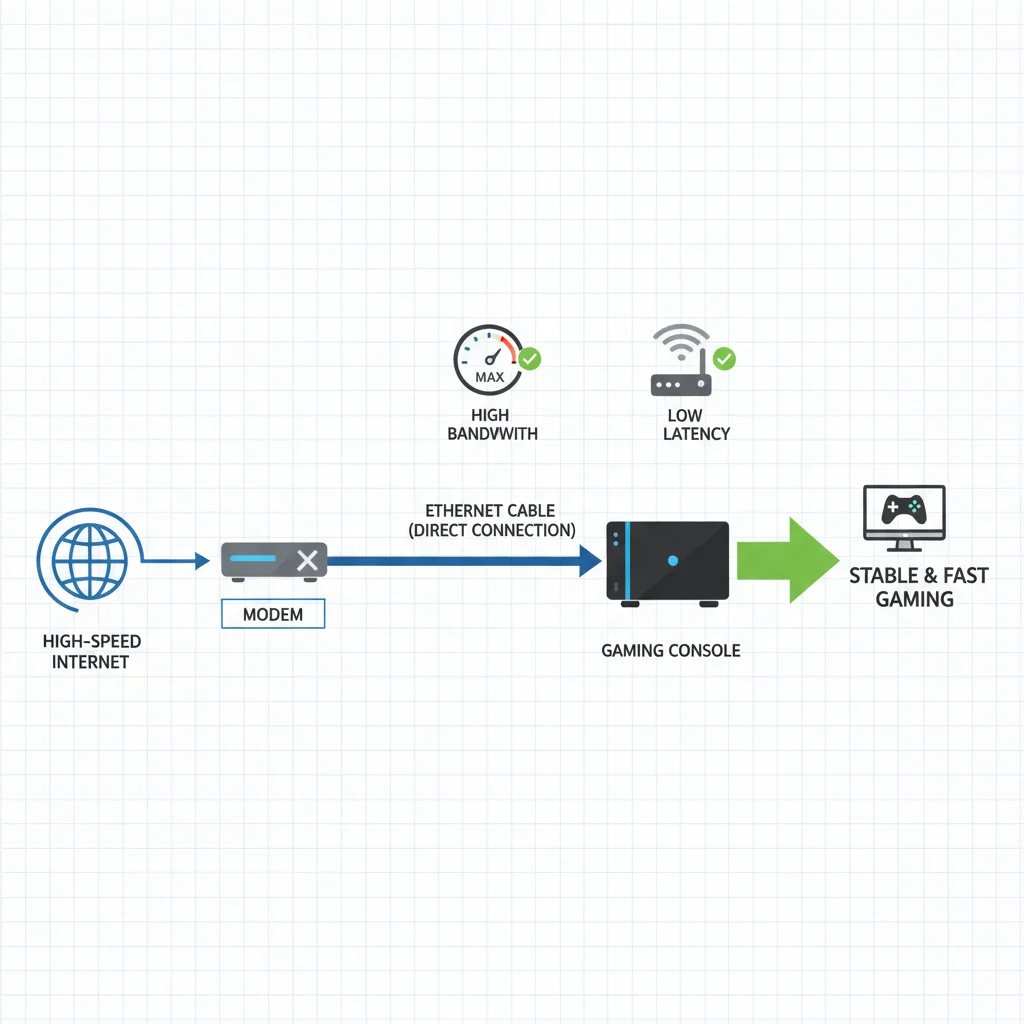
Always, always, always prioritize a wired Ethernet connection over Wi-Fi for online gaming. Ethernet cables provide a more stable, faster, and lower-latency connection. Wi-Fi is susceptible to interference, signal drops, and higher latency, which can be detrimental in competitive gaming. If running an Ethernet cable isn’t feasible, ensure your Wi-Fi router is as close as possible to your console and uses the 5GHz band, which is faster but has a shorter range.
Optimizing Your Router Settings
Your home router is the gateway to the internet, and its settings can significantly impact your gaming experience.
- Quality of Service (QoS): Many modern routers offer QoS settings, which allow you to prioritize certain types of traffic. Configure QoS to give your console’s traffic highest priority, ensuring that other network activities (like streaming or downloads) don’t hog bandwidth.
- Port Forwarding & NAT Type: For some games, especially peer-to-peer multiplayer, configuring port forwarding can improve connectivity and reduce issues. Aim for an Open NAT type, which allows for the best possible connections to other players. Consult your console’s support pages or game-specific forums for recommended ports.
- DNS Settings: While often overlooked, changing your console’s DNS servers to a faster, more reliable public DNS (like Google DNS or Cloudflare DNS) can sometimes reduce latency and improve connection speeds.
- Firmware Updates: Just like your console, keep your router’s firmware updated. Manufacturers often release updates that improve performance, security, and stability.
Minimizing Network Congestion
The more devices connected to your network, and the more bandwidth they consume, the higher the chances of experiencing lag. During critical gaming sessions:
- Limit other network usage: Ask family members to pause downloads, streaming, or heavy internet usage.
- Disconnect unused devices: Turn off Wi-Fi on phones, tablets, or other devices not actively in use.
Physical Environment & Console Maintenance
The physical well-being of your console and its surroundings play a surprisingly significant role in its long-term performance. Overheating, dust accumulation, and poor ventilation can lead to throttling, reduced lifespan, and overall instability. This section of our console optimization guide focuses on keeping your hardware in pristine condition.
Proper Ventilation and Placement
Consoles generate a lot of heat, especially during intense gaming sessions. Proper ventilation is crucial to dissipate this heat and prevent overheating, which can lead to performance degradation (thermal throttling) and potential hardware damage.
- Clear Airflow: Ensure your console is placed in an open area with plenty of space around its intake and exhaust vents. Avoid enclosing it in tight cabinets or placing it against walls.
- Elevate Your Console: If possible, slightly elevate your console to improve airflow underneath it. Small stands or risers can help.
- Beware of Heat Sources: Do not place your console near other heat-generating devices, direct sunlight, or heating vents.
Dust Management: The Silent Killer
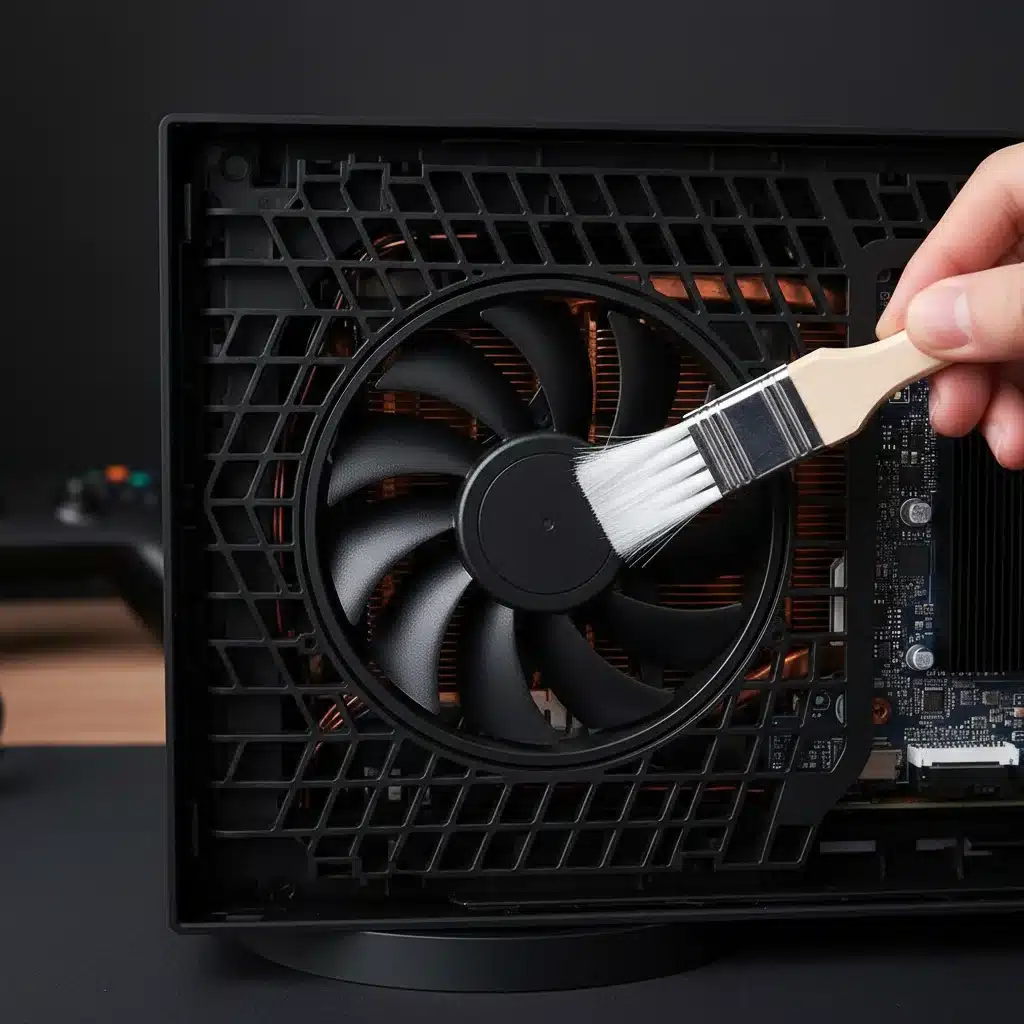
Dust is the enemy of electronics. It accumulates inside your console, coating components and clogging vents, acting as an insulator that traps heat. Regular dust removal is non-negotiable for anyone serious about console optimization guide principles.
- Regular Cleaning: Use a can of compressed air to gently blow dust out of the console’s vents. Do this in a well-ventilated area, and hold the can upright to prevent propellant discharge.
- Vacuuming (Carefully): You can gently vacuum around the exterior vents to remove surface dust, but avoid putting the vacuum hose directly against the vents, as strong suction can potentially damage internal components or static electricity can build up.
- Professional Cleaning: For older consoles or those in very dusty environments, a professional cleaning might be necessary. This involves opening the console to clean internal fans and heatsinks, but this should only be done by experienced technicians to avoid voiding warranties or causing damage.
Controller Maintenance
While not directly affecting console performance, a well-maintained controller is essential for optimal gameplay. Clean your controller regularly, especially around buttons and joysticks. If you experience stick drift, look into recalibration options or consider replacing the faulty component if you’re comfortable with repairs, or purchasing a new controller.
Advanced Optimization Techniques for the Enthusiast
For those who want to push their console’s performance to its absolute limit, here are a few more advanced tips that form part of a holistic console optimization guide.
External Storage Optimization
If you use an external SSD, ensure it’s connected to the fastest available USB port on your console (e.g., USB 3.0 or higher). Keep the external drive’s firmware updated if applicable. Defragmenting an external HDD (if you use one) can also improve performance, though this is less relevant for SSDs.
Power Settings and Rest Mode Efficiency
Consoles often have various power settings. While ‘Rest Mode’ or ‘Standby’ is convenient for quick resume and background downloads, ensure it’s configured efficiently. For example, some consoles allow you to disable network features in rest mode if you don’t need background updates, saving a tiny bit of power and potentially reducing wear. For absolute zero background activity and maximum power saving, a full shutdown is always an option.
Display Calibration
Your console outputs a signal, but your TV or monitor interprets it. Calibrating your display can significantly enhance visual quality and reduce input lag. Many TVs have a ‘Game Mode’ which bypasses most post-processing to reduce input lag. Always enable this for gaming. Adjust brightness, contrast, color temperature, and sharpness to ensure you’re seeing the game as intended, without crushing blacks or blowing out whites. This subtle tweak, while not directly console performance, completes the visual aspect of a comprehensive console optimization guide.
Understanding Input Lag
Input lag is the delay between your action on the controller and that action appearing on screen. It’s influenced by your controller (wireless vs. wired, battery), your console processing, and most significantly, your display. Using ‘Game Mode’ on your TV is the primary way to reduce display-related input lag. Also, ensuring your controller is fully charged or using a wired connection for competitive play can minimize controller lag.
The Future of Console Optimization: What to Expect in 2026 and Beyond
As we look towards the mid-2020s, the landscape of console gaming continues to evolve rapidly. This console optimization guide wouldn’t be complete without a glimpse into what the future might hold and how it will impact our optimization strategies.
AI-Powered Optimization
Expect more consoles and games to integrate AI and machine learning for dynamic, real-time optimization. This could mean systems that automatically adjust game settings based on your play style, network conditions, or even internal console temperatures to maintain optimal performance without manual intervention. AI might also predict and pre-load assets more intelligently, further reducing loading times and stuttering.
Cloud Gaming Integration
With the rise of cloud gaming services, some aspects of optimization might shift from local hardware to network infrastructure. While your internet connection will become even more critical, the burden on your console’s local processing power for certain titles could diminish, allowing for higher fidelity or frame rates streamed from remote servers. However, network optimization will remain paramount, transforming our console optimization guide to include more emphasis on ISP choices and home network setup.
Adaptive Resolution Scaling and FSR/DLSS Equivalents
Technologies like AMD’s FidelityFX Super Resolution (FSR) and NVIDIA’s Deep Learning Super Sampling (DLSS) are already making their way onto consoles, allowing games to render at a lower internal resolution and then intelligently upscale to a higher output resolution with minimal visual loss. Expect these technologies to become more sophisticated and widespread, offering gamers the best of both worlds: high frame rates and stunning visuals. Understanding and utilizing these in-game options will be a key part of any future console optimization guide.
More Modular and Upgradeable Consoles
While traditional console generations have been largely static, there’s a growing trend towards mid-generation refreshes (like the PS4 Pro and Xbox One X) and potentially more modular designs in the future. This could mean easier internal storage upgrades, or even user-replaceable components, which would fundamentally change how we approach hardware optimization and maintenance. Keeping an eye on these developments will be crucial for staying ahead in the realm of console optimization guide practices.
Conclusion: Your Journey to Peak Gaming Performance
Optimizing your gaming console in 2026 is an ongoing process, not a one-time setup. It requires a blend of understanding your hardware, diligently managing your software, fine-tuning your network, and maintaining your physical setup. By following the comprehensive steps outlined in this console optimization guide, you are not just improving frame rates; you are investing in a more immersive, responsive, and ultimately, more enjoyable gaming experience.
Remember that the goal is not just to chase the highest numbers, but to find the perfect balance that suits your personal gaming preferences and the specific demands of the games you play. Whether you’re a casual player looking for smoother gameplay or a competitive esports enthusiast striving for every possible advantage, applying these optimization techniques will empower you to unlock your console’s full potential.
Stay vigilant for new console firmware updates, game patches, and advancements in display and network technology. The world of gaming is dynamic, and so too should be your approach to optimization. With this ultimate console optimization guide in hand, you are well-equipped to conquer any challenge the digital realm throws your way, enjoying peak performance for years to come.