Implementing MFA Beyond Passwords: A 3-Step Guide for U.S. Users
Implementing Multi-Factor Authentication (MFA) beyond passwords is crucial for U.S. users to establish robust digital defenses against escalating cyber threats, moving past single-factor vulnerabilities for enhanced account protection.
In an increasingly digital world, the security of our online accounts is paramount. For U.S. users, understanding and implementing advanced security measures is no longer optional but a necessity. This guide will walk you through the essential steps for implementing Multi-Factor Authentication (MFA) beyond passwords: a 3-step guide to enhanced account protection for U.S. users, moving beyond the simple password to a more fortified digital presence.
Understanding the Limitations of Passwords Alone
Traditional passwords, while still a fundamental component of online security, are increasingly insufficient on their own. Cybercriminals are constantly developing sophisticated methods to bypass or crack them, leaving individuals and organizations vulnerable. Relying solely on a password, no matter how complex, is akin to locking your front door but leaving a spare key under the doormat – it provides a false sense of security.
The landscape of cyber threats is evolving rapidly, with phishing attacks, brute-force attempts, and credential stuffing becoming commonplace. Many users also fall into the trap of reusing passwords across multiple services, creating a domino effect if one account is compromised. This widespread practice significantly amplifies the risk, making a single breach potentially catastrophic for a user’s entire digital life. Therefore, understanding these inherent weaknesses is the first critical step toward building a stronger defense.
The Rise of Credential Theft
Credential theft remains one of the most prevalent attack vectors. Attackers leverage stolen passwords from data breaches, often combining them with usernames or email addresses to gain unauthorized access to accounts. The sheer volume of compromised credentials available on the dark web makes this a lucrative strategy for cybercriminals.
- Phishing Attacks: Deceptive emails or websites designed to trick users into revealing their login credentials.
- Brute-Force Attacks: Automated attempts to guess passwords by trying numerous combinations.
- Credential Stuffing: Using stolen username/password pairs from one breach to try and log into other services.
- Malware: Software designed to secretly collect login information from infected devices.
In conclusion, the era of relying solely on passwords for robust security is undeniably over. The sophisticated nature of modern cyberattacks demands a more layered approach. Recognizing these vulnerabilities is the crucial foundational knowledge that propels us towards adopting more advanced protective measures.
Step 1: Assessing Your Current Security Posture and Identifying Critical Accounts
Before you can effectively implement enhanced security measures, it’s essential to understand where you currently stand. This involves taking an inventory of your digital footprint and identifying which accounts hold the most sensitive information or represent the highest risk if compromised. For U.S. users, this often includes financial institutions, healthcare portals, government services, and primary email accounts.
Begin by listing all online services you use regularly. Don’t forget those seemingly innocuous accounts that might be linked to more critical ones. Once you have this comprehensive list, categorize them by their level of sensitivity. Your email, for instance, often serves as the recovery mechanism for many other accounts, making it a prime target and thus a critical account.
Inventorying Your Digital Footprint
Creating a detailed inventory of your online accounts is the bedrock of a strong security strategy. This isn’t just about remembering your usernames; it’s about understanding the interconnectedness of your digital life and identifying potential weak points. Think about every service you’ve signed up for, from online banking to social media, shopping sites, and utility providers.
- Financial Accounts: Banks, investment platforms, credit card portals.
- Email Accounts: Primary and secondary email services, often linked to password resets.
- Social Media: Platforms that hold personal information and connections.
- Cloud Storage: Services like Google Drive, Dropbox, iCloud containing documents and photos.
- Healthcare Portals: Access to personal medical records and appointments.
Prioritizing these accounts allows you to allocate your security efforts most effectively. Focus on securing the most critical assets first, as a breach in these areas could have the most significant impact on your financial well-being, privacy, or identity. This systematic assessment ensures that no crucial account is overlooked in your security upgrade.
Step 2: Choosing and Implementing Diverse MFA Methods
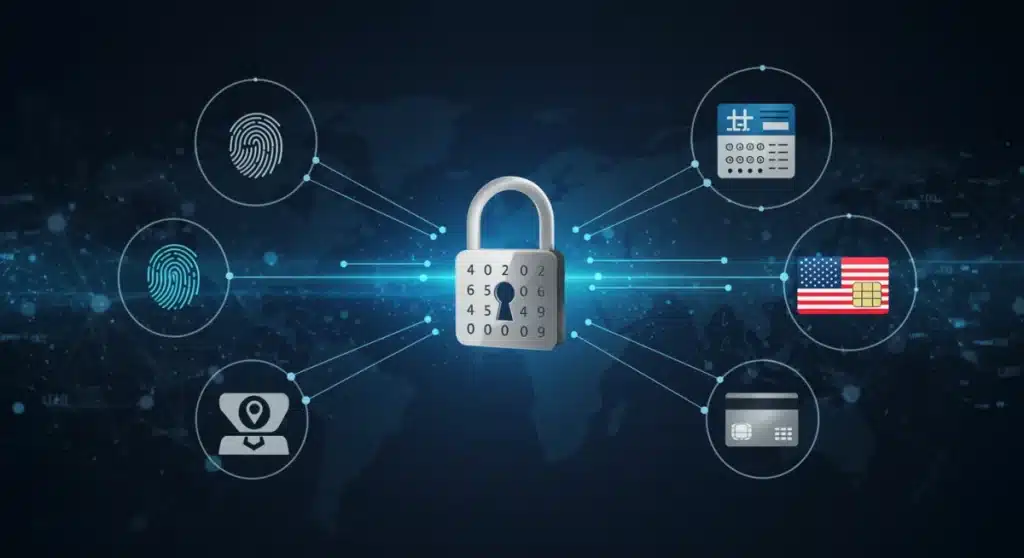
With your critical accounts identified, the next step is to select and implement appropriate Multi-Factor Authentication methods that go beyond simple passwords. MFA adds layers of verification, requiring users to provide two or more pieces of evidence to prove their identity. These factors typically fall into three categories: something you know (like a password), something you have (like a phone or hardware token), and something you are (like a fingerprint or facial scan).
The goal here is to diversify your authentication methods, making it significantly harder for attackers to gain access even if they manage to compromise one factor. Not all MFA methods are created equal in terms of security and convenience, so understanding the options available is key to making informed choices for your specific needs as a U.S. user.
Exploring Different MFA Options
The market offers a variety of MFA solutions, each with its strengths and weaknesses. Selecting the right combination often depends on the level of security required for a particular account and the user’s preference for convenience. It’s advisable to use the strongest available MFA for your most critical accounts.
- Authenticator Apps (e.g., Google Authenticator, Authy): Generate time-based one-time passwords (TOTP) on your smartphone. These are highly secure as they don’t rely on cellular networks.
- Hardware Security Keys (e.g., YubiKey): Physical devices that plug into a USB port or connect wirelessly, offering the strongest form of MFA. They are resistant to phishing.
- Biometric Authentication: Fingerprint scans, facial recognition, or iris scans used on devices. While convenient, they rely on the device’s security and can be less robust than hardware keys.
- SMS-based OTPs: One-time codes sent via text message. While better than nothing, they are susceptible to SIM-swapping attacks and are generally considered less secure than app-based or hardware MFA.
When implementing these methods, always follow the specific instructions provided by each service. Many platforms offer step-by-step guides for enabling MFA. Prioritize using authenticator apps or hardware keys for your most sensitive accounts, especially your primary email and financial services, as these offer superior protection against common attack vectors.

In summary, embracing diverse MFA methods is a proactive step towards fortifying your digital defenses. By moving beyond SMS-based OTPs and adopting stronger, phishing-resistant options, U.S. users can significantly enhance their account protection against sophisticated cyber threats.
Step 3: Regular Review, Education, and Advanced Protection Strategies
Implementing MFA is not a one-time task; it requires ongoing vigilance. The digital threat landscape is constantly evolving, and what is considered secure today might be vulnerable tomorrow. Therefore, for U.S. users, regular review of your security settings, continuous education on new threats, and the adoption of advanced protection strategies are crucial components of a robust cybersecurity posture.
This final step ensures that your defenses remain current and effective against emerging threats. It involves staying informed, updating your methods, and considering additional layers of protection that can further secure your digital life beyond the initial MFA setup. Proactive engagement with your security is key to long-term protection.
Staying Informed and Adapting
The cybersecurity world is dynamic, with new vulnerabilities and attack techniques discovered regularly. Staying informed about these developments is vital to maintaining effective protection. Follow reputable cybersecurity news sources, subscribe to security alerts, and be aware of common scams targeting U.S. consumers.
- Security Awareness Training: Regularly educate yourself on phishing, social engineering, and other common attack methods.
- Software Updates: Keep all operating systems, applications, and browsers updated to patch known vulnerabilities.
- Password Management: Use a strong, unique password for every account, ideally generated and stored by a reputable password manager.
- Account Monitoring: Regularly check your account activity for any suspicious logins or transactions.
Furthermore, consider advanced protection strategies such as security awareness training, which can help you identify and avoid social engineering attacks that might bypass even strong MFA. Implementing these practices creates a comprehensive defense that goes beyond technical controls, fostering a culture of security in your daily digital interactions. Regular review ensures that your MFA methods are still appropriate and that all critical accounts are adequately protected.
The Future of Authentication: Passwordless and Beyond
While MFA significantly enhances security, the industry is already looking towards the next generation of authentication: passwordless solutions. These methods aim to eliminate the password entirely, relying instead on a combination of biometrics, hardware tokens, and cryptographic keys. For U.S. users, understanding these emerging trends is crucial for staying ahead of the curve in digital security.
Passwordless authentication promises not only enhanced security but also a more seamless user experience, removing the friction associated with remembering and managing complex passwords. As technology advances, these solutions will likely become the standard, further solidifying our digital defenses against evolving threats.
Emerging Authentication Technologies
The move towards a passwordless future is driven by the desire for both stronger security and improved usability. Several technologies are at the forefront of this shift, offering innovative ways to prove identity without relying on traditional passwords.
- FIDO Standards (Fast Identity Online): A set of open technical specifications for passwordless authentication, allowing users to log in with biometrics or security keys.
- WebAuthn: A web standard published by the W3C and FIDO Alliance, enabling strong, phishing-resistant authentication for web applications.
- Magic Links: One-time login links sent to a user’s verified email address, eliminating the need for a password.
- Device-based Biometrics: Leveraging built-in biometric sensors on smartphones and computers for authentication, often integrated with FIDO.
These technologies represent a significant leap forward in authentication. By adopting passwordless methods, U.S. users can achieve a level of security that is inherently more resistant to many of the common cyberattacks that plague password-based systems. It’s a proactive step towards a more secure and user-friendly digital ecosystem, ensuring greater protection for sensitive information and online identities.
Benefits of Advanced MFA for U.S. Users
Implementing advanced Multi-Factor Authentication offers a multitude of benefits, particularly for U.S. users who often deal with highly sensitive personal and financial data online. Beyond simply preventing unauthorized access, a robust MFA strategy provides peace of mind and significantly reduces the impact of potential data breaches.
The advantages extend to compliance with various U.S. regulations and industry standards, which increasingly mandate stronger authentication protocols. By adopting these measures, individuals and businesses alike can bolster their security posture, protect their assets, and maintain trust in their digital interactions.
Key Advantages of Robust MFA
Moving beyond basic passwords and embracing comprehensive MFA solutions brings several critical benefits that directly address the modern threat landscape. These advantages are crucial for anyone looking to secure their digital life effectively.
- Enhanced Security: Significantly reduces the risk of account takeover, even if a password is stolen.
- Phishing Resistance: Many advanced MFA methods, like hardware keys, are inherently resistant to phishing attacks.
- Compliance & Trust: Helps individuals and organizations meet regulatory requirements (e.g., HIPAA, PCI DSS) and build trust with users.
- Reduced Fraud: Minimizes financial losses and identity theft by preventing unauthorized transactions and access to sensitive data.
- Peace of Mind: Provides a greater sense of security knowing that accounts are protected by multiple layers of defense.
Ultimately, the benefits of advanced MFA far outweigh any perceived inconvenience. For U.S. users, it’s an indispensable tool in the fight against cybercrime, offering a powerful defense that protects personal information, financial assets, and digital identity in an increasingly interconnected world. Embracing these technologies is a smart investment in your digital future.
| Key Step | Brief Description |
|---|---|
| Assess Security Posture | Identify critical accounts and understand current vulnerabilities. |
| Implement Diverse MFA | Choose and enable strong MFA methods like authenticator apps or hardware keys. |
| Regular Review & Education | Stay informed, update software, and continuously adapt to new threats. |
| Embrace Passwordless Future | Explore and prepare for emerging authentication technologies like FIDO standards. |
Frequently Asked Questions About MFA
The primary benefit of MFA is its ability to significantly enhance security by requiring multiple forms of verification. Even if a password is compromised, an attacker still needs a second factor, such as a physical token or biometric data, to gain access, making unauthorized entry far more difficult.
No, not all MFA methods offer the same level of security. Hardware security keys are generally considered the most secure due to their resistance to phishing. Authenticator apps are also highly secure, while SMS-based codes are less so due to vulnerabilities like SIM-swapping attacks.
It’s recommended to review your MFA settings and enabled methods at least annually, or whenever there’s a significant change in your online activity or a new security threat emerges. This ensures your protection remains up-to-date and effective against evolving risks.
While MFA significantly boosts security, it’s not a silver bullet against all cyberattacks. It primarily protects against unauthorized access due to compromised passwords. Other threats, like malware on your device or social engineering, still require additional layers of protection and user vigilance.
Passwordless authentication methods aim to remove the need for traditional passwords entirely. They rely on alternative verification factors such as biometrics (fingerprints, facial recognition), hardware security keys, or magic links, offering a more secure and often more convenient login experience.
Conclusion
For U.S. users navigating the complexities of the digital landscape, implementing Multi-Factor Authentication beyond traditional passwords is no longer a luxury but a fundamental necessity. By systematically assessing critical accounts, strategically choosing diverse and robust MFA methods, and committing to continuous review and education, individuals can erect formidable defenses against an ever-evolving array of cyber threats. Embracing this proactive approach not only secures personal data and financial assets but also fosters a more resilient and trustworthy online environment for everyone. The journey towards enhanced account protection is ongoing, and MFA is an indispensable tool in that critical endeavor.