MFA Implementation: Blocking 99.9% of Cyberattacks by 2026
In an increasingly digital world, the threat landscape evolves at an alarming pace. Automated attacks, ranging from credential stuffing to phishing campaigns, are becoming more sophisticated and frequent. Traditional password-based authentication, once considered sufficient, is now a glaring vulnerability. The imperative to move beyond simple passwords is no longer a recommendation but a critical necessity for any organization aiming to protect its digital assets and maintain trust. This is where a robust MFA implementation strategy becomes not just beneficial, but absolutely indispensable.
The promise is bold, yet achievable: implementing Multi-Factor Authentication (MFA) can block an astounding 99.9% of automated attacks. This isn’t just a hypothetical figure; it’s a statistic backed by industry leaders and cybersecurity experts, highlighting the profound impact MFA has on an organization’s security posture. With a target of June 2026, organizations have a clear timeline to fortify their defenses and safeguard against the relentless barrage of cyber threats.
This comprehensive guide delves into the nuances of an effective MFA implementation strategy. We will explore why MFA is so effective, the various types of MFA available, best practices for deployment, common challenges and how to overcome them, and the future trends that will shape identity and access management. Our goal is to provide you with the knowledge and actionable insights needed to embark on or refine your MFA journey, ensuring your organization is resilient against the cyberattacks of today and tomorrow.
The Critical Need for Multi-Factor Authentication (MFA)
To understand the power of an MFA implementation strategy, we must first grasp the inherent weaknesses of single-factor authentication, primarily passwords. Passwords, despite their ubiquity, are notoriously vulnerable. They can be weak, reused across multiple accounts, stolen through phishing, or brute-forced by automated bots. Once a password is compromised, an attacker gains immediate access, often undetected until significant damage has been done.
The Password Problem: A Gateway for Attackers
- Weak Passwords: Many users opt for simple, easy-to-remember passwords, making them susceptible to dictionary attacks.
- Password Reuse: A common habit, password reuse means a single breach can compromise multiple accounts.
- Phishing and Social Engineering: Attackers trick users into revealing their credentials through deceptive emails or websites.
- Credential Stuffing: Automated bots use lists of stolen usernames and passwords to gain unauthorized access to other services.
- Brute-Force Attacks: Attackers systematically try every possible password combination until the correct one is found.
These vulnerabilities highlight a fundamental flaw in relying solely on ‘something you know.’ This is precisely why MFA is so effective: it adds layers of defense, requiring ‘something you have’ or ‘something you are’ in addition to ‘something you know.’
How MFA Blocks 99.9% of Automated Attacks
The statistic that MFA can block 99.9% of automated attacks is often cited by entities like Microsoft, and it underscores the profound impact of even a basic MFA implementation strategy. Automated attacks, by their very nature, rely on exploiting single points of failure, primarily compromised passwords. When an additional factor is required, these automated scripts hit a wall.
- Credential Stuffing Mitigation: Even if an attacker has a stolen username and password, they cannot complete the login without the second factor (e.g., a code from an authenticator app, a fingerprint scan).
- Phishing Resilience: While sophisticated phishing can sometimes bypass certain MFA types, most basic phishing attempts are thwarted because the attacker cannot provide the real-time second factor.
- Brute-Force Defense: Brute-force attacks become virtually impossible to execute successfully when an additional, dynamic factor is required for each login attempt.
The effectiveness of MFA lies in its ability to break the attack chain. It transforms a single point of compromise into a multi-faceted challenge for attackers, drastically increasing the effort and sophistication required for a successful breach. For organizations aiming to enhance their security posture, a thoughtful MFA implementation strategy is the most impactful step they can take.
Understanding Different Types of MFA
A successful MFA implementation strategy begins with understanding the various types of authentication factors available. Each type offers different levels of security, convenience, and cost, making the choice dependent on an organization’s specific needs and risk profile. Generally, MFA factors fall into three categories:
1. Something You Know (Knowledge Factors)
This is the traditional password or PIN. While it serves as one factor, it’s the weakest link if used alone. In an MFA setup, it’s combined with other factors to enhance security.
- Passwords/PINs: Secret strings of characters known only to the user.
- Security Questions: Questions whose answers are supposedly known only to the user, though often susceptible to social engineering.
2. Something You Have (Possession Factors)
These are physical items that the user possesses. They are generally more secure than knowledge factors because they are harder to steal or guess remotely.
- Hardware Tokens: Small devices that generate one-time passcodes (OTPs) or respond to challenges. Examples include RSA SecurID tokens.
- Software Tokens/Authenticator Apps: Applications on a smartphone or computer that generate time-based OTPs (TOTP) or HMAC-based OTPs (HOTP). Google Authenticator, Microsoft Authenticator, and Authy are popular examples.
- SMS/Email OTPs: Codes sent to a registered phone number or email address. While convenient, they are susceptible to SIM-swapping attacks and phishing.
- Push Notifications: A prompt sent to a mobile device, requiring the user to approve a login attempt. More user-friendly and often more secure than SMS.
- Security Keys (e.g., FIDO2/WebAuthn, YubiKey): Physical USB, NFC, or Bluetooth devices that provide cryptographic authentication. These are considered highly secure and phishing-resistant.
3. Something You Are (Inherence Factors)
These are unique biological characteristics of the user. Biometrics offer high security and convenience, as they are difficult to replicate and always with the user.
- Fingerprint Scans: Using unique ridge patterns on a finger for authentication.
- Facial Recognition: Analyzing unique facial features for identity verification.
- Iris Scans: Capturing and analyzing the unique patterns in a user’s iris.
- Voice Recognition: Identifying users based on the unique characteristics of their voice.
Choosing the Right Combination for Your MFA Implementation Strategy
The effectiveness of your MFA implementation strategy often hinges on selecting the right combination of factors. While SMS OTPs are better than no MFA, they are not considered phishing-resistant. For higher security, organizations are increasingly moving towards authenticator apps, push notifications, and especially hardware security keys (like FIDO2/WebAuthn), which offer the strongest protection against phishing and automated attacks.
Consider the following when selecting factors:
- Security Level: How resistant is the factor to various attack vectors (phishing, man-in-the-middle, replay attacks)?
- User Experience: How easy and convenient is it for users to adopt and use the factor?
- Cost: What are the financial implications of deploying and maintaining the chosen factors?
- Scalability: Can the chosen solution scale with your organization’s growth?
- Compliance Requirements: Does the MFA solution meet industry-specific regulations and standards?
A balanced approach that prioritizes security without unduly burdening users is key to successful adoption and long-term effectiveness of any MFA implementation strategy.
Crafting a Robust MFA Implementation Strategy: A Step-by-Step Guide
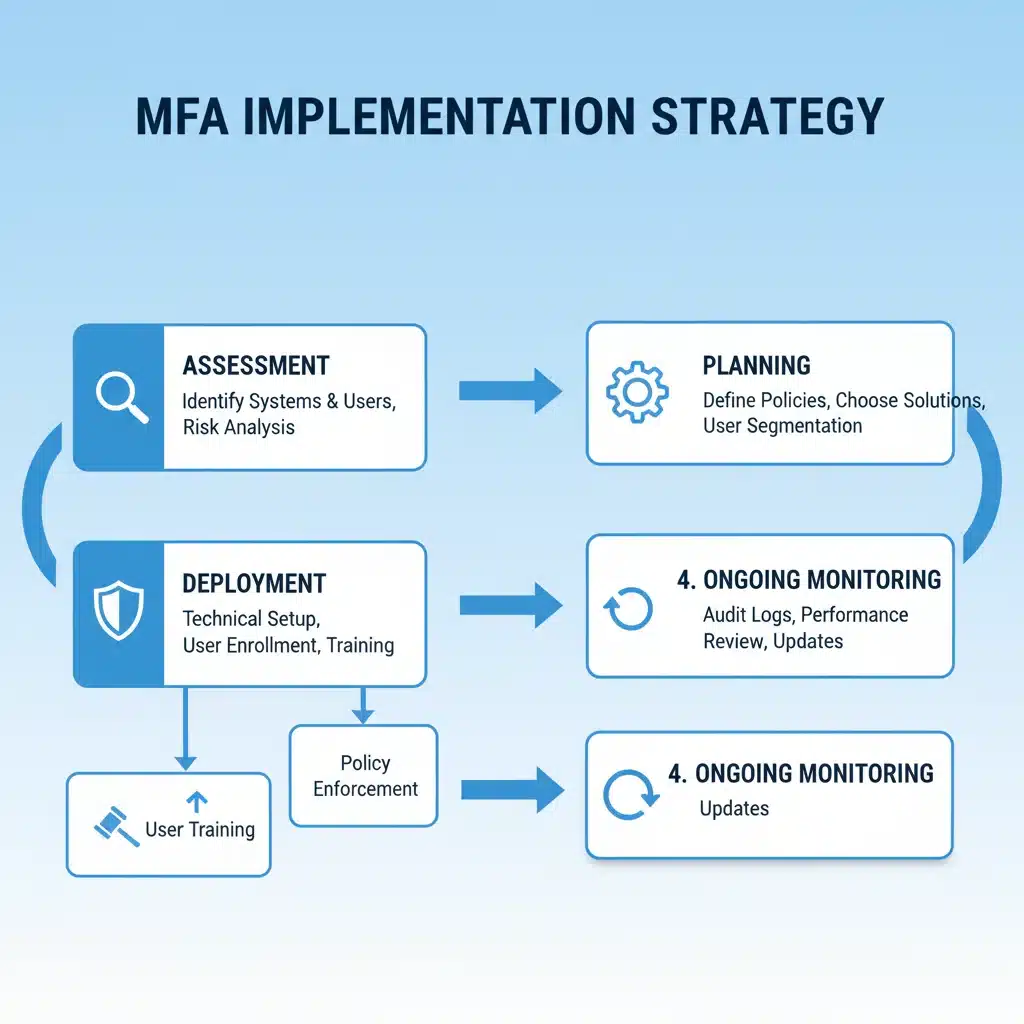
Implementing MFA across an organization is a significant undertaking that requires careful planning and execution. A well-defined MFA implementation strategy is crucial for minimizing disruption, maximizing adoption, and achieving the desired security benefits. Here’s a step-by-step guide:
Step 1: Assess Your Current Environment and Identify Critical Assets
Before deploying any new security measure, understand what you’re protecting and where your vulnerabilities lie.
- Inventory All Systems and Applications: List all applications, services, and systems that require user authentication. Prioritize those containing sensitive data or critical business functions.
- Identify User Groups: Segment your user base (e.g., administrators, executives, general employees, external partners). Different groups may require different MFA policies or factors.
- Evaluate Existing Authentication Methods: Understand current password policies, single sign-on (SSO) solutions, and any legacy authentication systems.
- Conduct a Risk Assessment: Determine the potential impact of a breach for each system and user group. This will help prioritize your MFA implementation strategy.
Step 2: Define Your MFA Goals and Policies
Clearly articulate what you aim to achieve with MFA and establish the rules of engagement.
- Set Clear Objectives: Beyond blocking 99.9% of automated attacks, what specific security and compliance goals do you have?
- Develop MFA Policies: Define which users will use which MFA factors, under what circumstances (e.g., for all logins, for privileged access, from untrusted networks). Consider conditional access policies.
- Establish Enrollment and Recovery Procedures: How will users enroll their MFA devices? What is the process for recovering access if an MFA device is lost or compromised?
- Communication Strategy: Plan how you will communicate the changes to your users, emphasizing the ‘why’ behind the MFA implementation strategy.
Step 3: Choose Your MFA Solution and Factors
Based on your assessment and policies, select the appropriate technology.
- Select an MFA Provider: Research vendors that offer the types of MFA factors you need (e.g., Microsoft Azure AD MFA, Duo Security, Okta, Google Cloud Identity). Consider integration with existing identity providers.
- Prioritize Factors: As discussed earlier, opt for phishing-resistant factors like FIDO2 security keys or strong authenticator apps where possible. For less critical applications, SMS or email OTPs might be a temporary solution, but should be used with caution.
- Consider User Experience: Aim for solutions that are easy for users to adopt and integrate seamlessly into their workflows.
Step 4: Pilot Program and Phased Rollout
A gradual approach minimizes disruption and allows for adjustments.
- Start with a Pilot Group: Deploy MFA to a small, tech-savvy group of users (e.g., IT staff) to identify any issues and gather feedback.
- Iterate and Refine: Use feedback from the pilot to fine-tune your configuration, documentation, and user training materials.
- Phased Rollout: Implement MFA across different departments or user groups in stages. Start with privileged users, then move to other high-risk groups, and finally to the broader user base.
Step 5: User Training and Support
User adoption is paramount to the success of your MFA implementation strategy.
- Comprehensive Training: Provide clear, concise training on how to enroll and use MFA. Explain the benefits to them (e.g., protecting their accounts).
- Create Documentation: Develop easy-to-understand guides and FAQs.
- Dedicated Support Channel: Establish a clear support process for users encountering issues with MFA enrollment or usage.
- Address Resistance: Be prepared to address user concerns and provide compelling reasons for the change.
Step 6: Monitor, Audit, and Adapt
MFA is not a set-it-and-forget-it solution; continuous management is essential.
- Monitor MFA Usage: Track enrollment rates, successful authentications, and any failed attempts.
- Regular Audits: Periodically review MFA configurations, policies, and user accounts to ensure compliance and identify potential vulnerabilities.
- Stay Updated: Keep abreast of new MFA technologies and emerging threats. Be prepared to adapt your MFA implementation strategy as the threat landscape evolves.
- Incident Response Planning: Ensure your incident response plan accounts for MFA-related security incidents, such as compromised MFA devices.
Following these steps will lay a solid foundation for a successful MFA implementation strategy, significantly enhancing your organization’s cybersecurity posture and moving closer to the goal of blocking 99.9% of automated attacks.
Overcoming Common Challenges in MFA Implementation
While the benefits of MFA are undeniable, organizations often encounter hurdles during the MFA implementation strategy. Addressing these challenges proactively is key to a smooth and successful rollout.
1. User Adoption and Resistance
Users may perceive MFA as an inconvenience, leading to resistance or attempts to bypass it.
- Solution: Focus on clear communication about the ‘why.’ Explain the benefits to the user (personal account protection) and the organization (data security, job security). Provide extensive training and easy-to-follow guides. Emphasize that a robust MFA implementation strategy is for their protection.
- Solution: Choose user-friendly MFA methods, such as push notifications or biometrics, where appropriate. Minimize friction by integrating MFA seamlessly into existing workflows.
2. Complexity and Integration Issues
Integrating MFA with diverse legacy systems, cloud applications, and different identity providers can be complex.
- Solution: Prioritize integration with your primary identity provider (e.g., Azure AD, Okta, Google Workspace). Leverage industry standards like SAML, OAuth, and OpenID Connect to facilitate integration.
- Solution: Consider a unified MFA solution that can protect both cloud and on-premises applications. This simplifies management and reduces integration headaches for your MFA implementation strategy.
- Solution: For legacy systems that don’t natively support modern MFA, explore proxy solutions or API gateways that can layer MFA on top.
3. Cost and Resource Constraints
The upfront cost of MFA solutions, hardware tokens, and the internal resources required for deployment and ongoing management can be a concern.
- Solution: Conduct a thorough cost-benefit analysis. Highlight the potential cost savings from preventing breaches, regulatory fines, and reputational damage. The investment in a strong MFA implementation strategy pales in comparison to the cost of a major cyberattack.
- Solution: Explore cloud-based MFA services, which often have lower upfront costs and managed services that reduce the burden on internal IT teams.
- Solution: Utilize existing infrastructure where possible, such as smartphone-based authenticator apps, which reduce hardware costs.
4. Account Recovery and Help Desk Burden
Lost devices, forgotten passwords, or issues with MFA factors can lead to an increased workload for the IT help desk.
- Solution: Implement robust, secure, and user-friendly self-service account recovery options. This empowers users to resolve common issues without IT intervention.
- Solution: Train help desk staff extensively on MFA troubleshooting and recovery procedures. Document all processes clearly to ensure consistent support.
- Solution: Implement multiple recovery options for users, such as backup codes or secondary MFA factors, to reduce reliance on a single method.
5. Phishing and Advanced Attack Bypasses
While MFA blocks 99.9% of automated attacks, sophisticated phishing and man-in-the-middle attacks can sometimes bypass weaker MFA methods (like SMS OTPs).

- Solution: Prioritize phishing-resistant MFA factors like FIDO2/WebAuthn security keys. These methods cryptographically tie authentication to the legitimate site, making phishing virtually impossible.
- Solution: Educate users about advanced phishing techniques. Regular security awareness training is a critical component of any comprehensive MFA implementation strategy.
- Solution: Implement conditional access policies that evaluate context (device health, location, IP address) before granting access, adding another layer of defense.
By proactively addressing these common challenges, organizations can ensure their MFA implementation strategy is not only effective but also sustainable and widely adopted, contributing significantly to their overall cybersecurity resilience.
The Future of Authentication: Beyond Basic MFA
While a strong MFA implementation strategy is critical today, the landscape of authentication is continuously evolving. The future promises even more sophisticated and seamless security measures, moving towards adaptive and passwordless experiences.
Adaptive and Context-Aware Authentication
The next evolution of MFA involves dynamic authentication based on context. Adaptive MFA assesses various risk signals in real-time to determine the appropriate level of authentication required. This means a user might only need a password if they are logging in from a known device, trusted network, and usual location, but will be prompted for additional factors if any of these conditions change.
- Risk-Based Authentication: Analyzes factors like IP address, device posture, location, time of day, and user behavior to dynamically adjust authentication requirements.
- Behavioral Biometrics: Continuously monitors user behavior (typing patterns, mouse movements, gait) to verify identity without explicit user interaction.
An advanced MFA implementation strategy will increasingly incorporate these adaptive elements to balance security and user convenience seamlessly.
Passwordless Authentication
The ultimate goal for many is to move beyond passwords entirely. Passwordless authentication removes the weakest link in the security chain, eliminating the need for users to remember complex strings of characters.
- FIDO2/WebAuthn: Cryptographic keys (hardware or platform authenticators) that provide strong, phishing-resistant, and passwordless authentication. This is rapidly becoming the gold standard for secure web authentication.
- Magic Links/One-Time Codes: While not truly passwordless in the long term, these can reduce password fatigue for certain applications.
- Biometrics as Primary Factor: Using fingerprints, facial recognition, or iris scans as the primary means of authentication, often combined with device possession.
Organizations developing their MFA implementation strategy should look towards incorporating FIDO2 and other passwordless technologies to future-proof their authentication systems.
Zero Trust Architecture
MFA is a foundational component of a Zero Trust security model. Zero Trust operates on the principle of ‘never trust, always verify,’ meaning every access attempt, regardless of origin, must be authenticated and authorized. MFA ensures that the ‘verify’ part of this principle is robust.
- Continuous Verification: Authentication isn’t a one-time event; users and devices are continuously verified throughout their session.
- Least Privilege Access: Users are granted only the minimum access necessary to perform their tasks.
Integrating MFA deeply into a Zero Trust framework strengthens the overall security posture, ensuring that even if one factor is compromised, the system remains secure. A holistic MFA implementation strategy will consider its role within a broader Zero Trust initiative.
Artificial Intelligence and Machine Learning in Authentication
AI and ML are playing an increasingly vital role in enhancing authentication security and user experience.
- Fraud Detection: AI algorithms can analyze vast amounts of data to detect anomalies and identify potentially fraudulent login attempts in real-time.
- User Behavior Analytics (UBA): ML models can learn typical user behaviors and flag deviations that might indicate a compromise, triggering additional authentication challenges.
- Automated Threat Response: AI can automate responses to detected threats, such as blocking suspicious IPs or temporarily locking accounts.
As organizations refine their MFA implementation strategy, incorporating AI/ML capabilities will provide an advanced layer of defense, making authentication systems smarter and more resilient against evolving threats.
The journey towards robust authentication is ongoing. While achieving the goal of blocking 99.9% of automated attacks by June 2026 with a solid MFA implementation strategy is a significant milestone, staying ahead of cybercriminals requires continuous adaptation and adoption of these emerging authentication technologies. The future is secure, intelligent, and ultimately, passwordless.
Conclusion: Securing Your Future with a Proactive MFA Implementation Strategy
The digital landscape is a battlefield, and passwords alone are no longer sufficient armor. The statistics are clear: implementing Multi-Factor Authentication is not merely a good idea; it is a fundamental pillar of modern cybersecurity, capable of blocking an astonishing 99.9% of automated attacks. The target of June 2026 serves as a critical deadline for organizations to fortify their digital defenses and adopt a proactive stance against an ever-evolving array of cyber threats. A well-executed MFA implementation strategy is the most impactful step an organization can take to achieve this.
Throughout this guide, we’ve explored the critical need for MFA, dissecting the inherent weaknesses of traditional passwords and demonstrating how MFA adds essential layers of defense. We’ve delved into the various types of MFA factors, from knowledge-based to possession and inherence factors, emphasizing the importance of choosing phishing-resistant options like FIDO2 security keys for maximum protection. The detailed, step-by-step guide to crafting a robust MFA implementation strategy provides a clear roadmap for assessment, policy definition, solution selection, phased rollout, user training, and continuous monitoring.
We also addressed the common challenges that organizations face during MFA deployment, including user adoption, integration complexities, cost concerns, and help desk burden. By proactively planning for these hurdles and adopting the suggested solutions, organizations can ensure a smoother transition and higher success rate for their MFA implementation strategy. Furthermore, looking ahead, we discussed the exciting future of authentication, highlighting adaptive MFA, passwordless technologies, the foundational role of MFA in Zero Trust architectures, and the transformative power of AI and machine learning in enhancing security and user experience.
The journey to robust security is continuous, but the foundation laid by a comprehensive MFA implementation strategy is unshakeable. By investing in MFA today, organizations are not just protecting their data and systems; they are safeguarding their reputation, ensuring compliance, and building trust with their customers and partners. Don’t wait for a breach to act. Take the decisive step towards a more secure future by implementing a strong MFA solution and moving confidently towards the goal of blocking 99.9% of automated attacks. Your organization’s digital resilience depends on it.