[Software Name] Review: Is It Worth the Hype in 2024?

[Software Name] is a project management software gaining traction in the US market, but this review dives deep into its features, pricing, and user experience to determine if it truly lives up to the hype and is the right choice for your specific needs.
In the bustling landscape of project management tools, [Software Name] review: Does it live up to the hype in the US market? is a question many businesses are asking. Let’s dissect the software and see if it’s a valuable asset.
What is [Software Name] and What Does It Offer?
Before diving into a detailed analysis, it’s crucial to understand what [Software Name] is and what functionalities it brings to the table. This section will outline its core features and intended user base.
[Software Name] is a project management software designed to help teams organize tasks, manage deadlines, and collaborate effectively. It aims to streamline workflows and improve overall project visibility.
Core Features of [Software Name]
[Software Name] boasts a variety of features intended to simplify project management. Here’s a look at some of the key components:
- Task Management: Creating, assigning, and tracking tasks with due dates and priorities.
- Collaboration Tools: Real-time communication, file sharing, and feedback features for team members.
- Reporting and Analytics: Tracking project progress, identifying bottlenecks, and generating performance reports.
- Integration Capabilities: Connecting with other tools like CRM systems, accounting software, and communication platforms.
These features, when combined, offer a comprehensive solution for managing projects of various scales. The software attempts to provide a central hub for all project-related activities, improving efficiency and transparency.
In conclusion, [Software Name] offers a wide array of features intended to streamline project management processes. From task management to collaboration and reporting, it strives to be a comprehensive solution for teams looking to enhance their productivity and project success.
User Interface and Ease of Use
The user interface (UI) and overall ease of use are pivotal factors in determining the success of any software. After all, even the most feature-rich application will fall short if it’s difficult to navigate and understand.
In this section, we’ll explore the user interface of [Software Name], focusing on its intuitiveness, design, and user-friendliness.
First Impressions
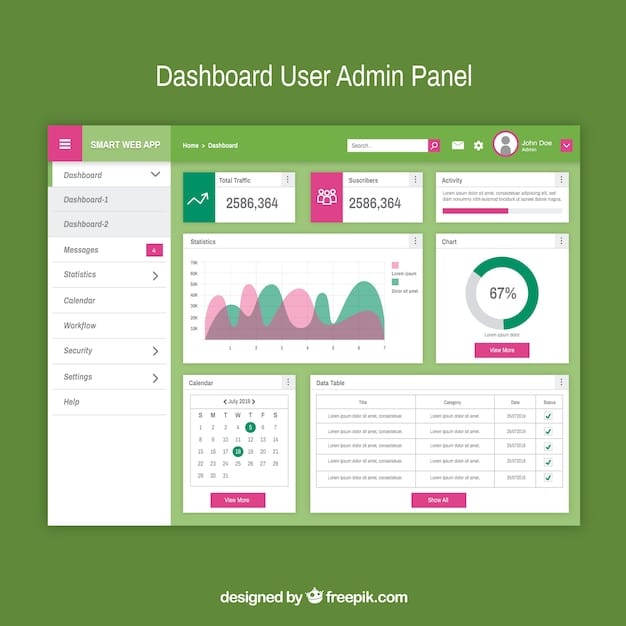
Upon logging into [Software Name] for the first time, users are greeted with a clean and relatively modern interface. The dashboard provides an overview of current projects, tasks, and upcoming deadlines.
The navigation menu is straightforward and easy to understand, allowing users to quickly access different sections of the software. However, the initial setup process might be a bit overwhelming for those who are new to project management tools.
Navigability and Design
Navigating through [Software Name] is generally seamless. The software employs a logical structure, with clearly labeled sections and intuitive icons. The design is clean and uncluttered, which helps to reduce visual distractions.
However, some users might find the customization options to be limited. While the software offers some degree of personalization, it lacks the flexibility to fully tailor the interface to individual preferences.
In summary, [Software Name] boasts a user-friendly interface with a clean design and intuitive navigation. While the initial setup process may require some learning, the overall experience is generally positive.
Pricing Plans: Which One is Right for You?
Understanding the pricing structure is a vital step in evaluating whether any software is the right fit for your needs. This section will provide a detailed overview of the pricing plans offered by [Software Name], helping you determine which one aligns with your budget and requirements.
[Software Name] offers a range of pricing plans designed to accommodate different team sizes and project needs. These plans typically vary based on the number of users, available features, and storage capacity.
Here’s a breakdown of the common pricing tiers:
- Free Plan: Typically limited in terms of users, storage, and features, ideal for small teams or individuals.
- Basic Plan: Offers more features and higher limits compared to the Free Plan, suitable for small to medium-sized businesses.
- Standard Plan: Provides a balance of features and affordability, often the most popular choice for growing businesses.
- Premium Plan: Includes all available features and priority support, designed for larger organizations with complex needs.
Each pricing tier offers distinct advantages and disadvantages; therefore, it’s critical to carefully assess your project requirements and team size before making a decision. Factor in the long-term scalability of your projects and choose a plan that can accommodate your business’s growth.
In conclusion, [Software Name]’s pricing plans cater to a diverse range of users and budgets. By carefully considering your needs and evaluating the features included in each tier, you can select the plan that provides the best value for your investment.
Integration and Compatibility
In today’s interconnected business environment, the ability of software to seamlessly integrate with other tools is critical. This section will explore the integration capabilities of [Software Name], assessing its compatibility with other popular platforms and applications.
[Software Name] aims to improve project managers’ workflows by providing integrations with a plethora of third-party tools. These integrations might range from well-known CRM software to communication tools, and accounting systems.
Key Integrations
Here’s a look at some of its key integrations:
- CRM Software: Salesforce, HubSpot, Zoho CRM
- Communication Platforms: Slack, Microsoft Teams
- File Storage: Google Drive, Dropbox, OneDrive
- Accounting Software: QuickBooks, Xero
These integrations can significantly streamline workflows, eliminating the need to switch between different applications. For instance, integrating with Slack allows for real-time notifications and updates directly within your team’s communication channel.
Compatibility
[Software Name] is generally compatible with a wide range of devices and operating systems. It is available as a web-based application, meaning it can be accessed from any device with an internet browser. Mobile apps are also available for both iOS and Android devices.
In conclusion, [Software Name] offers robust integration capabilities, allowing it to seamlessly connect with various popular platforms. Its compatibility across different devices and operating systems enhances its usability and accessibility.

Customer Support and Training Resources
Reliable customer support and comprehensive training resources are essential for ensuring a smooth user experience. This section will evaluate the quality of customer support offered by [Software Name] and the availability of training materials.
Effective customer support can make a significant difference, especially when users encounter technical issues or have questions about using the software. Similarly, thorough training resources can help users quickly become proficient in using the tool.
Customer Support Channels
[Software Name] typically offers various customer support channels, including:
- Email Support: Users can submit queries via email and receive assistance from the support team.
- Live Chat: Real-time chat support for immediate assistance with urgent issues.
- Phone Support: Direct phone line for speaking with a support representative.
Furthermore, the responsiveness and helpfulness of the support team are crucial factors. Many users indicate that [Software Name] offers prompt and effective assistance, resolving issues in a timely manner.
Training Resources
To help users get up to speed, [Software Name] provides a range of training resources, such as:
- Knowledge Base: A comprehensive library of articles and FAQs covering various aspects of the software.
- Video Tutorials: Step-by-step video guides demonstrating how to use different features.
- Webinars: Live online training sessions conducted by experts.
These resources can significantly speed up the learning curve and empower users to make the most of the software’s capabilities. Users appreciate the wealth of training materials available, noting that they are clear, concise, and easy to follow.
In summary, [Software Name] offers both robust customer support and comprehensive training resources. User feedback suggests that the support team is responsive and helpful, and the training materials effectively guide users through the software’s features.
Pros and Cons: A Balanced Perspective
Before arriving at a final verdict, it’s essential to weigh the pros and cons of [Software Name]. This section provides a balanced perspective, highlighting the software’s strengths and weaknesses.
Identifying the strengths and weaknesses allows potential users to make an informed decision based on their specific requirements and priorities.
Pros
Here are some of the notable advantages of using [Software Name]:
- User-Friendly Interface: Easy to navigate and understand, even for new users.
- Comprehensive Feature Set: Includes a wide range of tools for task management, collaboration, and reporting.
- Integration Capabilities: Seamlessly connects with other popular platforms and applications.
These pros are often cited by users as key reasons for choosing [Software Name]. The user-friendly interface reduces the learning curve, and the comprehensive feature set caters to a variety of project management needs.
Cons
On the other hand, [Software Name] also has some drawbacks:
- Limited Customization: Some users find the customization options to be restricted.
- Pricing: Can be expensive for smaller teams, particularly when opting for higher-tier plans.
- Occasional Glitches: Some users have reported occasional technical problems.
These cons are important to consider, especially for those with specific requirements. The limited customization might not be suitable for users who prefer a highly tailored experience, and the pricing might be a barrier for smaller businesses.
In conclusion, [Software Name] offers a compelling array of advantages, including a user-friendly interface, a comprehensive feature set, and robust integration capabilities. However, it also exhibits some drawbacks, such as limited customization, higher pricing, and occasional glitches. Weighing these pros and cons against your needs can help you make an informed decision.
| Key Aspect | Brief Description |
|---|---|
| ⭐ Core Features | Task management, collaboration tools, and reporting features. |
| 💰 Pricing Plans | Offers free, basic, standard, and premium plans based on user needs. |
| 🔗 Integrations | Integrates with CRM, communication, file storage, and accounting software. |
| 👍 Pros & Cons | User-friendly but limited customization & can get costly, technical issues. |
Frequently Asked Questions
▼
[Software Name] primarily targets project managers and teams who need tools for tasks, collaboration, & reporting.
▼
Yes, [Software Name] generally offers a free trial period to allow users to test the software before committing to a paid plan.
▼
It suits organizations of all sizes, with scalable plans and features for complex projects and big teams.
▼
[Software Name] focuses on simplicity and is easier to use than Jira. Ideal for project teams, not just development teams.
▼
[Software Name] implements several security measures, complying with standards such as GDPR and SOC 2 for secure data.
Conclusion
In conclusion, [Software Name] is a robust project management tool that offers a user-friendly experience with a comprehensive set of features. While it has a few shortcomings, such as limited customization and potential pricing issues, its numerous advantages make it a viable option for improving project success. Whether it lives up to the hype ultimately depends on your team’s specific needs and priorities.